Salam,
Sekadar perkongsian.
For those who have free time and get internet access for free, you can try to do online survey.
Reliable online survey
I did try myself and already get the voucher/money. Kindly try these online surveys:
1. Global Test Market (redeem for money)
2. Toluna (redeem for money)
3. YouGov (redeem for money)
4. Vase (money)
5. AIP Online (Redeem for Giant voucher)
6. MOBROG (redeem for money)
Besides that, I do have loyalty cards to collect points and redeem for things.
Loyalty Card
1. BCard @ B Infinite ( usually I use to redeem photobook voucher)
2. PETRONAS Mesra Card ( To redeem fuel)
3. AirAsia Big Member (to redeem flight ticket)
4. PETRON Miles (convert miles point to AirAsia Big point)
Updated as of 27/8/2019
I found another way to get extra money which is via your handphone!:)
Legit Mobile app
1. CashPirate App ( redeem for money)
2. Cashzine App (redeem for money)
So, how about you guys?Can you share any tips to #savemoney & #getextramoney?
Showing posts with label photobook. Show all posts
Showing posts with label photobook. Show all posts
Thursday, October 26, 2017

Friday, October 6, 2017
Photobook as low as RM 1. Seriously?????
Absolutely YES!
*Please take note this applicable for 6 x 6 inch Mini Square Softcover photobook ONLY!*
Where to purchase the voucher?
Purchase voucher from online shopping website such as 11street, lazada, fave and etc. Check regularly, and the cheapest price I obtained was RM 1!!!
How to avoid from paying the postage fee?
Collect Bpoints and redeem the points using Binfinite app.Usually, 1000 points for RM 10 gift card of photobook. However, it depends on the BInfinite promotion, sometime you only need 500 points to get RM10 gift card.The gift card can be used to pay your postage fee. Till today, i already redeem up to RM 50 photobook gift card through BInfinite App :):):).
How to collect Bpoint? Refer HERE
Update:
As of 30/1/2018:
Promo by BInfinite, Redeem 620 point = RM 10 photobook voucher :). Siapa cepat dia dapat.

Sunday, September 17, 2017
Another photobook just arrived #Letkeepthememories
Salam,
Yeay, today I received another ordered photobook :)
Luckily, for my latest collection, it is FREEEEE and I just need to pay the postage fee which cost me around RM8.++. However, previously, I used the redemption of Bpoint which gave me around RM 10 voucher of photobook, hence, no need to pay the postage. Conclusion, my photobook for this time is TOTALLY FREEEEEE.
How I get the FREE voucher of photobook???
Tadaaa

I got an email from photobook regarding the GIFT above :)
For your information, it's difficult to get promo price for the respective size of photobook:)
Special thanks to Photobook Worldwide, Malaysia SEA Games Team & Binfinite (Redeem Bpoint to get the voucher of photobook which can use for postage purpose).

How to create photobook? Refer HERE
How to collect Bpoint? Refer HERE
Hope will help you.
Thank you
Monday, April 24, 2017
Review & Design 6 x 6 mini softcover photobook dari Photobook Malaysia.Part III #Letkeepthememories
Salam,
Sambungan dari SINI
Selepas dah confirm order kalau tak mau upload lagi pon tak apa. Buat bila-bila free. .Masa yang diambil untuk upload melebihi 40 minit... Huhu..lama. Maka Eija lakukan proses upload pada waktu malam/tengah malam. Ketika upload, Eija tinggalkan laptop, masuk tidor. Esok check tengok dah setel.hahah
If nak upload time free, buka balik photobook software,open existing project dan completekan order.
 |
| KLik dekat photobook berkenaan dan kemudian klik send file |
 |
| Klik seperti di atas |

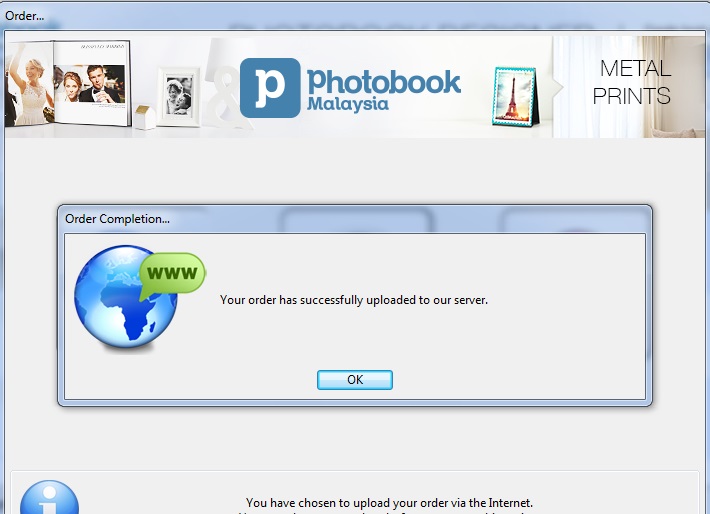 |
| Setel upload!!! |
Masa untuk production photobook dalam 2-3 hari (Kalau nasib baik, dalam sehari ja dah siap). Tambah masa penghantaran oleh Pos Laju dalam 2-3 hari jugak. Nanti Photobook akan emel pasal shipping matters and usually they email at midnight.hahaha.
Selepas Eija dapat tracking number, asyik cek ja dah sampai mana photobook Eija.Excited.haha.

Tips:
Part I
Part II
p/s: Nak jimat postage for photobook? Kumpul point B Infinite banyak-banyak,kemudian redeem point for photobook voucher. Click HERE for details regarding B INFINITE #tipjimateija
Selepas Eija dapat tracking number, asyik cek ja dah sampai mana photobook Eija.Excited.haha.
 |
| My first photobook with size of 6 x6 inch |

 |
| boleh pilih layout template. nak letak banyak-banyak gambar atau sekeping ja setiap page |
Tips:
1. Jangan lupa click " Auto Enhance" untuk setiap gambar. Takut nanti bila print out gambar akan menjadi lebih gelap dari original gambar.
2. Gambar download dari facebook tidak digalakkan sebab pixel akan pecah due to low resolution (pendapat Eija).Better gambar original dari camera @ handphone.
3.Elakkan 2 page 1 photo. Sebab kat tengah2 tu akan berlipat so ada gambar tak berapa nampak, tersepit di tengah :) (seperti photo di bukit bendera di atas).
4. Boleh add wording.
5. Mohon pastikan internet power ya nak upload :P..haha
6. Untuk makluman, setiap photobook akan dikenakan postage. Tak boleh combine 2 photobook dengan satu postage.
6. Untuk makluman, setiap photobook akan dikenakan postage. Tak boleh combine 2 photobook dengan satu postage.
More details on photobook designer guideline :
Do visit PHOTOBOOK MALAYSIA
Hope will help you ( This is based on what I did and experienced).
#Letkeepthe memories
Previous post regarding photobook, as follow:
Previous post regarding photobook, as follow:
Part I
Part II
p/s: Nak jimat postage for photobook? Kumpul point B Infinite banyak-banyak,kemudian redeem point for photobook voucher. Click HERE for details regarding B INFINITE #tipjimateija
Review & Design 6 x 6 mini softcover photobook dari Photobook Malaysia.Part II #Letkeepthememories
sambungan dari SINI
Salam,
Selepas selesai untuk 40 Pages,
Yeay masa untuk submit.
 |
| click cart order tu |
 |
| click next |

Kemudian, akan di link kan ke website photobook (Browser: Mozila Chrome ) . Eija punya default browser Google Chrome, tapi photobook website akan di buka di Mozila Chrome.

Kemudian, akan dipaparkan seperti di bawah
 |

 |
| Perhatikan perubahan harga |
Seterusnya,pilih jenis pos. Untuk makluman, Photobook Malaysia menggunakan courier POS LAJU. Postage cost RM 8.48 (including GST)


Sorry, yang Eija tunjukkan di atas ni Eija kena bayar dalam RM 5.++ disebabkan Eija mempunyai value Gift Card photobook yang di redeem menggunakan Bpoints (Untuk makluman, Eija redeem 1000 points dapat value gift card of RM 20 Photobook Malaysia. Maka,Eija dapat 2 buah photobook yang bernilai RM 1 ja (beli voucher dari 11street..jimatttt).
Bila kita ada value gift card, automatik photobook akan tolak total balance hutang yang ada, yakni dalam kes kita, caj penghantaran. Kalau nak redeem gift card, masukkan ja code ke dalam Gift card box.
Di bawah ini ditunjukkan payment method:

Kemudian selesaikan pembayaran dan confirm order.

Kos untuk membuat sebuah mini photobook softcover 6" x 6 " :
1. Voucher code : RM 1 ( Dari 11street.kalau masih ada promosi cari di sini.. Dapatkan segera sebelum promosi habis)
2. Kos postage : RM 8.48
Total cost : RM 9.48
At least kalau masukkan 1 page 1 photo pon dah ada dekat 40 photo. Average cost dalam 23 sen/photo.Jimatttt kan.
Untuk makluman proses tak habis lagi.huhu. Kena upload file photobook kita.
To be continue..
Sunday, April 16, 2017
Review & Design 6 x 6 mini softcover photobook dari Photobook Malaysia.Part 1 #Letkeepthememories
Sukaaaaa sangat dengan photobook #Letkeepthememories.
Eija beli voucher promosi size 6 x 6 di 11street. RM 1 ja :):):):).. Berbaloi-baloi.
Hope lepas ni ada lagi promosi :)
Skarang tengah gila dok buat photobook .haha.mencari-cari balik gambar lama-lama. Dari biar duduk dalam hp/laptop, better print. Nak print 4r pon mahal, dan cara jimat, buat photobook sebab boleh masukkan banyak gambar.
 |
| Love it! |
Voucher photobook boleh didapati antaranya di Lazada, 11street , Fave , Photobook .
(ni link yg Eija jumpa voucher harga serendah rm 2 hari ini:))
https://myfave.com/kuala-lumpur/photobook-malaysia-kota-kemuning-6-x-6-mini-square-softcover-photobook-40-pages-36794
Kemudian, Eija download Photobook Designer seperti link di bawah:
http://www.photobook.com.my/tools/bookmaking-tools/
Dah lepas download, you can start design your photobook!How?
1.Click create new project.

 |
| click photobook and next |
 |
| choose hardcover/softcover |
 |
| Pilih size photobook. Untuk Eija, 6 x 6. |
 |
| Berikan nama projek anda dan create |
2. Start insert your photo
 |
| Add your photo.Then,design your front & back page. |
 |
| Pilih page styles yang berkenan di hati. Pastu drag pic masuk dalam box. Jgn lupa click AutoEnhance dkt pic yg dimasukan dalam box tu. |
Tips: Jangan lupa click Auto enhance tu untuk cerahkan gambar (make sure untuk setiap gambar buat). Jika tidak ,gambar turn out jadi gelap dari original bila dah print nanti. Jika rasa gambar gelap,isikan "brightness) yang sesuai.
Sorry,to be continue :P
p/s: Untuk jimat lagi, sekarang Bpoints ada promosi (promosi sehingga 30 April dan limit 2 voucher/person). Redeem 500 points dapat voucher/gift card bernilai RM 10.jimatttt...
 |
| Eija dah redeem 2 voucher :) |
Subscribe to:
Posts (Atom)